


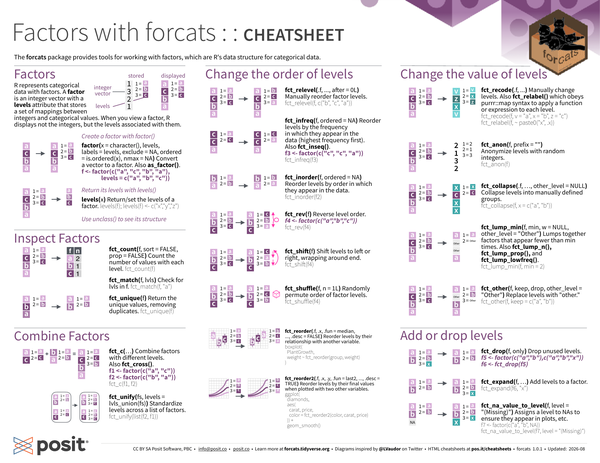
The forcats package provides tools for working with factors, which are R’s data structure for categorical data.
library(forcats)Factors#
R represents categorical data with factors. A factor is an integer vector with a levels attribute that stores a set of mappings between integers and categorical values. When you view a factor, R displays not the integers but the levels associated with them.
For example, R will display c("a", "c", "b", "a") with levels c("a", "b", "c") but will store c(1, 3, 2, 1) where 1 = a, 2 = b, and 3 = c.
R will display:
[1] a c b a
Levels: a b c
R will store:
[1] 1 3 2 1
attr(,"levels")
[1] "a" "b" "c"
Create a factor with factor():
-
factor(x = character(), levels, labels = levels, exclude = NA, ordered = is.ordered(x), nmax = NA): Convert a vector to a factor. Alsoas_factor().f <- factor(c("a", "c", "b", "a"), levels = c("a", "b", "c"))
Return its levels with levels():
-
levels(x): Return/set the levels of a factor.levels(f) levels(f) <- c("x", "y", "z")
Use unclass() to see its structure.
Inspect Factors#
-
fct_count(f, sort = FALSE, prop = FALSE): Count the number of values with each level.fct_count(f) -
fct_match(f, lvls): Check forlvlsinf.fct_match(f, "a") -
fct_unique(f): Return the unique values, removing duplicates.fct_unique(f)
Combine Factors#
-
fct_c(...): Combine factors with different levels. Alsofct_cross().f1 <- factor(c("a", "c")) f2 <- factor(c("b", "a")) fct_c(f1, f2) -
fct_unify(fs, levels = lvls_union(fs)): Standardize levels across a list of factors.fct_unify(list(f2, f1))
Change the order of levels#
-
fct_relevel(.f, ..., after = 0L): Manually reorder factor levels.fct_relevel(f, c("b", "c", "a")) -
fct_infreq(f, ordered = NA): Reorder levels by the frequency in which they appear in the data (highest frequency first). Alsofct_inseq().f3 <- factor(c("c", "c", "a")) fct_infreq(f3) -
fct_inorder(f, ordered = NA): Reorder levels by order in which they appear in the data.fct_inorder(f2) -
fct_rev(f): Reverse level order.f4 <- factor(c("a", "b", "c")) fct_rev(f4) -
fct_shift(f): Shift levels to left or right, wrapping around end.fct_shift(f4) -
fct_shuffle(f, n = 1L): Randomly permute order of factor levels.fct_shuffle(f4) -
fct_reorder(.f, .x, .fun = median, ..., .desc = FALSE): Reorder levels by their relationship with another variable.boxplot(PlantGrowth, weight ~ fct_reorder(group, weight)) -
fct_reorder2(.f, .x, .y, .fun = last2, ..., .desc = TRUE): Reorder levels by their final values when plotted with two other variables.ggplot( diamonds, aes(carat, price, color = fct_reorder2(color, carat, price)) ) + geom_smooth()
Change the value of levels#
-
fct_recode(.f, ...): Manually change levels. Alsofct_relabel()which obeyspurrr::mapsyntax to apply a function or expression to each level.fct_recode(f, v = "a", x = "b", z = "c") fct_relabel(f, ~ paste0("x", .x)) -
fct_anon(f, prefix = ""): Anonymize levels with random integers.fct_anon(f) -
fct_collapse(.f, …, other_level = NULL): Collapse levels into manually defined groups.fct_collapse(f, x = c("a", "b")) -
fct_lump_min(f, min, w = NULL, other_level = "Other"): Lumps together factors that appear fewer thanmintimes. Alsofct_lump_n(),fct_lump_prop(), andfct_lump_lowfreq().fct_lump_min(f, min = 2) -
fct_other(f, keep, drop, other_level = "Other"): Replace levels with “other.”fct_other(f, keep = c("a", "b"))
Add or drop levels#
-
fct_drop(f, only): Drop unused levels.f5 <- factor(c("a", "b"), c("a", "b", "x")) f6 <- fct_drop(f5) -
fct_expand(f, ...): Add levels to a factor.fct_expand(f6, "x") -
fct_na_value_to_level(f, level = "(Missing)"): Assigns a level to NAs to ensure they appear in plots, etc.f <- factor(c("a", "b", NA)) fct_na_value_to_level(f, level = "(Missing)")
CC BY SA Posit Software, PBC • info@posit.co • posit.co
Learn more at forcats.tidyverse.org.
Updated: 2026-08.
packageVersion("forcats")[1] '1.0.1'