

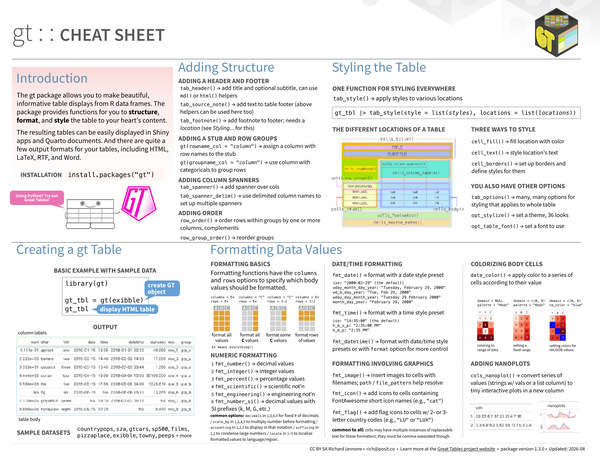
The gt package lets you turn R data frames into display tables by structuring, formatting, and styling every element. It is well-suited for Shiny apps, Quarto documents, and standalone HTML or PDF reports. All formatting is done through a consistent, pipeable API.
What’s covered#
- Introduction – package overview and sample datasets
- Creating a gt Table –
gt(), basic workflow, andexibbleexample - Adding Structure –
tab_header(),tab_source_note(),tab_footnote(), stub and row groups, column spanners,row_group_order() - Formatting Data Values –
fmt_number(),fmt_integer(),fmt_percent(),fmt_scientific(),fmt_date(),fmt_time(),fmt_datetime(),fmt_image(),fmt_icon(),fmt_flag() - Colorizing Body Cells –
data_color()with domain and palette options - Adding Nanoplots –
cols_nanoplot()for inline sparklines - Styling the Table –
tab_style()withcell_fill(),cell_text(),cell_borders(), and location helpers - Table-wide options –
tab_options(),opt_stylize(),opt_table_font()