



Intro#
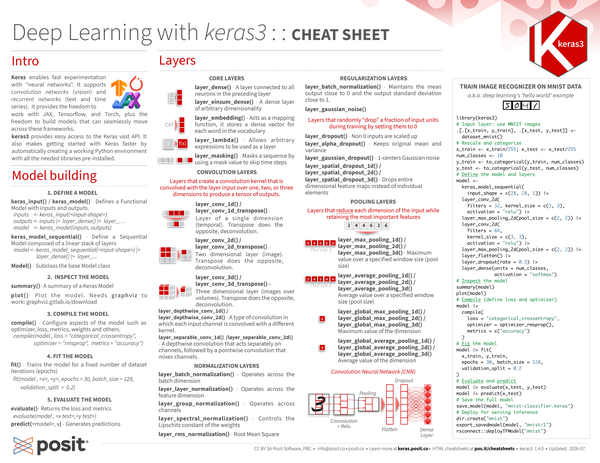
Keras enables fast experimentation with “neural networks”. It supports convolution networks (vision) and recurrent networks (text and time series). It provides the freedom to x work with JAX, Tensorflow, and Torch, plus the freedom to build models that can seamlessly move across these frameworks. keras3 provides easy access to the Keras vast API. It also makes getting started with Keras faster by automatically creating a working Python environment with all the needed libraries pre-installed.

Model building#
1. Define the model#
keras_input()/keras_model(): Defines a Functional Model with inputs and outputs.
inputs <- keras_input(<input-shape>)
outputs <- inputs |>
  layer_dense() |>
  layer_…
model <- keras_model(inputs, outputs)keras_model_sequential(): Define a Sequential Model composed of a linear stack of layers
model <- keras_model_sequential(<input-shape>) |>
  layer_dense() |>
layer_...Model(): Subclass the base Model class
2. Inspect the model#
-
summary(<model>): A summary of a Keras Model -
plot(<model>)Plot the model. Needs graphviz to work: graphviz.gitlab.io/download
3. Compile the model#
compile(): Configure aspects of the model such as optimizer, loss, metrics, weights and others.
model |>
  compile(
    loss = "categorical_crossentroy",
    optimizer = "rmsprp",
    metrics = "accuracy"
  )
4. Fit the model#
fit(): Trains the model for a fixed number of dataset iterations (epochs)
model |>
  fit(<x>, <y>, epochs = 30, batch_size = 128, validation_split = 0.2)
5. Evaluate the model#
evaluate(<model>): Returns the loss and metrics
model |>
  evaluate(<x test>,<y test>)
predict(<model>, x): Generates predictions
Example#
Train image recognizer on MNIST data a.k.a. deep learning’s ‘hello world’ example
library(keras3)

# Input layer: use MNIST images
.[.[x_train, y_train], .[x_test, y_test]] <- dataset_mnist()

# Rescale and categorize
x_train <- x_train / 255
x_test <- x_test / 255
num_classes <- 10
y_train <- to_categorical(y_train, num_classes)
y_test <- to_categorical(y_test, num_classes)

# Define the model and layers
model <- keras_model_sequential(
  input_shape = c(28, 28, 1)
) |>
  layer_conv_2d(
    filters = 32,
    kernel_size = c(3, 3),
    activation = "relu"
  ) |>
  layer_max_pooling_2d(pool_size = c(2, 2)) |>
  layer_conv_2d(
    filters = 64,
    kernel_size = c(3, 3),
    activation = "relu"
  ) |>
  layer_max_pooling_2d(pool_size = c(2, 2)) |>
  layer_flatten() |>
  layer_dropout(rate = 0.5) |>
  layer_dense(units = num_classes, activation = "softmax")

# Inspect the model
summary(model)

plot(model)

# Compile (define loss and optimizer)
model |>
  compile(
    loss = "categorical_crossentropy",
    optimizer = optimizer_rmsprop(),
    metrics = c("accuracy")
  )

# Fit the model
model |>
  fit(
    x_train,
    y_train,
    epochs = 30,
    batch_size = 128,
    validation_split = 0.2
  )

# Evaluate and predict
model |>
  evaluate(x_test, y_test)

model |>
  predict(x_test)

# Save the full model
save_model(model, "mnist-classifier.keras")

# Deploy for serving inference
dir.create("mnist")
export_savedmodel(model, "mnist/1")
rsconnect::deployTFModel("mnist")Layers#
Core layers#
-
layer_dense(): A layer connected to all neurons in the preceding layer -
layer_einsum_dense(): A dense layer of arbitrary dimensionality -
layer_embedding(): Acts as a mapping function, it stores a dense vector for each word in the vocabulary -
layer_lambda(): Allows arbitrary expressions to be used as a layer -
layer_masking(): Masks a sequence by using a mask value to skip time steps
Convolution layers#
Layers that create a convolution kernel that is convolved with the layer input over one, two, or three dimensions to produce a tensor of outputs.
-
layer_conv_1d()/layer_conv_1d_transpose(): Layer of a single dimension (temporal). Transpose does the opposite, deconvolution.\ -
layer_conv_2d()/layer_conv_2d_transpose(): Two dimensional layer (image). Transpose does the opposite, deconvolution. -
layer_conv_3d()/layer_conv_3d_transpose(): Three dimensional layer (images over volumes). Transpose does the opposite, deconvolution. -
layer_depthwise_conv_1d()/layer_depthwise_conv_2d(): A type of convolution in which each input channel is convolved with a different kernel. -
layer_separable_conv_1d()/layer_separable_conv_2d(): A depthwise convolution that acts separately on channels, followed by a pointwise convolution that mixes channels. -
layer_depthwise_conv_1d()/layer_depthwise_conv_2d(): A type of convolution in which each input channel is convolved with a different kernel. -
layer_separable_conv_1d()/layer_separable_conv_2d()- A depthwise convolution that acts separately on channels, followed by a pointwise convolution that mixes channels.
Normalization layers#
-
layer_batch_normalization(): Operates across the batch dimension -
layer_layer_normalization(): Operates across the feature dimension -
layer_group_normalization(): Operates across channels -
layer_spectral_normalization(): Controls the Lipschitz constant of the weights -
layer_rms_normalization(): Root Mean Square
Regularization layers#
-
layer_batch_normalization(): Maintains the mean output close to 0 and the output standard deviation close to 1. -
layer_gaussian_noise(): Layers that randomly “drop” a fraction of input units during training by setting them to 0 -
layer_dropout(): Non 0 inputs are scaled up -
layer_alpha_dropout(): Keeps original mean and variance -
layer_gaussian_dropout(): 1-centers Gaussian noise -
layer_spatial_dropout_1d()/layer_spatial_dropout_2d()/layer_spatial_dropout_3d(): Drops entire dimensional feature maps instead of individual elements
Pooling layers#
Layers that reduce each dimension of the input while retaining the most important features
-
layer_max_pooling_1d()/layer_max_pooling_2d()/layer_max_pooling_3d(): Maximum value over a specified window size (pool size) -
layer_average_pooling_1d()/layer_average_pooling_2d()/layer_average_pooling_3d(): Average value over a specified window size (pool size) -
layer_global_max_pooling_1d()/layer_global_max_pooling_2d()/layer_global_max_pooling_3d(): Maximum value of the dimension -
layer_global_average_pooling_1d()/layer_global_average_pooling_2d()/layer_global_average_pooling_3d(): Average value of the dimension
Preprocessing layers#
Numerical features#
-
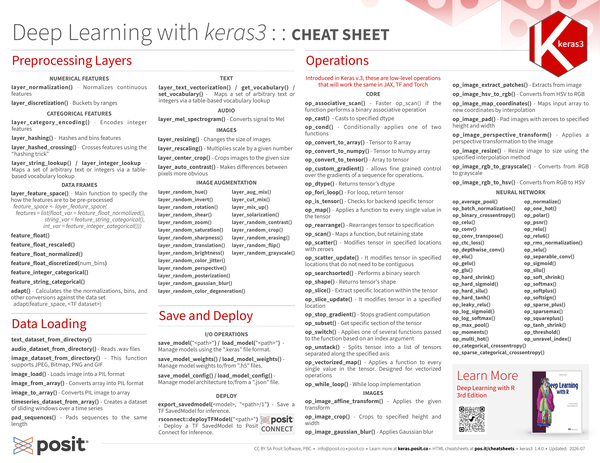
layer_normalization(): Normalizes continuous features -
layer_discretization(): Buckets by ranges
Categorical features#
-
layer_category_encoding(): Encodes integer features -
layer_hashing(): Hashes and bins features -
layer_hashed_crossing(): Crosses features using the “hashing trick” -
layer_string_lookup()/layer_integer_lookup(): Maps a set of arbitrary text or integers via a table-based vocabulary lookup
Data frames#
layer_feature_space(): Main function to specify the how the features are to be pre-processed
feature_space <- layer_feature_space(
  features = list(
    float_var = feature_float_normalized(),
    string_var = feature_string_categorical(),
    int_var = feature_integer_categoricl()
  )
)-
feature_float() -
feature_float_rescaled() -
feature_float_normalized() -
feature_float_discretized(num_bins) -
feature_integer_categorical() -
feature_string_categorical() -
adapt(): Calculates the the normalizations, bins, and other conversions against the data set
adapt(feature_space, <TF dataset>)Text#
layer_text_vectorization()/get_vocabulary()/set_vocabulary(): Maps a set of arbitrary text or integers via a table-based vocabulary lookup
Audio#
layer_mel_spectrogram(): Converts signal to Mel
Images#
-
layer_resizing(): Changes the size of images -
layer_rescaling(): Multiplies scale by a given number -
layer_center_crop(): Crops images to the given size -
layer_auto_contrast(): Makes differences between pixels more obvious
Image augmentation#
layer_aug_mix() |
layer_random_hue() |
layer_cut_mix() |
layer_random_invert() |
layer_mix_up() |
layer_random_rotation() |
layer_solarization() |
layer_random_shear() |
layer_random_contrast() |
layer_random_zoom() |
layer_random_crop() |
layer_random_saturation() |
layer_random_erasing() |
layer_random_sharpness() |
layer_random_flip() |
layer_random_translation() |
layer_random_grayscale() |
layer_random_brightness() |
layer_random_color_jitter() |
layer_random_gaussian_blur() |
layer_random_perspective() |
layer_random_color_degeneration() |
layer_random_posterization() |
Data Loading#
-
text_dataset_from_directory() -
audio_dataset_from_directory(): Reads .wav files -
image_dataset_from_directory(): This function supports JPEG, Bitmap, PNG and GIF -
image_load(): Loads image into a PIL format -
image_from_array(): Converts array into PIL format -
image_to_array(): Converts PIL image to array -
timeseries_dataset_from_array(): Creates a dataset of sliding windows over a time series -
pad_sequences(): Pads sequences to the same length
Save and Deploy#
I/O operations#
-
save_model("<path>")/load_model("<path>"): Manage models using the “.keras” file format. -
save_model_weights()/load_model_weights(): Manage model weights to/from “.h5” files. -
save_model_config()/load_model_config(): Manage model architecture to/from a “.json” file.
Deploy#
-
export_savedmodel(<model>, "<path>/1"): Save a TF SavedModel for inference. -
rsconnect::deployTFModel("<path>")- Deploy a TF SavedModel to Posit Connect for inference.
Operations#
Introduced in Keras v.3, these are low-level operations that will work the same in JAX, TF and Torch.
Core#
-
op_associative_scan(): Fasterop_scan()if the function performs a binary associative operation -
op_cast(): Casts to specified dtype -
op_cond(): Conditionally applies one of two functions -
op_convert_to_array(): Tensor to R array -
op_convert_to_numpy(): Tensor to Numpy array -
op_convert_to_tensor(): Array to tensor -
op_custom_gradient(): Allows fine grained control over the gradients of a sequence for operations. -
op_dtype(): Returns tensor’s dtype -
op_fori_loop(): For loop, return tensor -
op_is_tensor(): Checks for backend specific tensor -
op_map(): Applies a function to every single value in the tensor -
op_rearrange(): Rearranges tensor to specification -
op_scan(): Maps a function, but retaining state -
op_scatter(): Modifies tensor in specified locations with zeroes -
op_scatter_update(): It modifies tensor in specified locations that do not need to be contiguous -
op_searchsorted(): Performs a binary search -
op_shape(): Returns tensor’s shape -
op_slice(): Extract specific location within the tensor -
op_slice_update(): It modifies tensor in a specified location -
op_stop_gradient(): Stops gradient computation -
op_subset(): Get specific section of the tensor -
op_switch(): Applies one of several functions passed to the function based on an index argument -
op_unstack(): Splits tensor into a list of tensors separated along the specified axis -
op_vectorized_map(): Applies a function to every single value in the tensor. Designed for vectorized operations -
op_while_loop(): While loop implementation
Images#
-
op_image_affine_transform(): Applies the given transform -
op_image_crop(): Crops to specified height and width -
op_image_gaussian_blur(): Applies Gaussian blur -
op_image_extract_patches(): Extracts from image -
op_image_hsv_to_rgb(): Converts from HSV to RGB -
op_image_map_coordinates(): Maps input array to new coordinates by interpolation -
op_image_pad(): Pad images with zeroes to specified height and width -
op_image_perspective_transform(): Applies a perspective transformation to the image -
op_image_resize(): Resize image to size using the specified interpolation method -
op_image_rgb_to_grayscale(): Converts from RGB to grayscale -
op_image_rgb_to_hsv(): Converts from RGB to HSV
Neural network#
op_average_pool() |
op_batch_normalization() |
op_binary_crossentropy() |
op_celu() |
op_conv() |
op_conv_transpose() |
op_ctc_loss() |
op_depthwise_conv() |
op_elu() |
op_gelu() |
op_glu() |
op_hard_shrink() |
op_hard_sigmoid() |
op_hard_silu() |
op_hard_tanh() |
op_leaky_relu() |
op_log_sigmoid() |
op_log_softmax() |
op_max_pool() |
op_moments() |
op_multi_hot() |
op_categorical_crossentropy() |
op_sparse_categorical_crossentropy() |
op_normalize() |
op_one_hot() |
op_polar() |
op_psnr() |
op_relu() |
op_relu6() |
op_rms_normalization() |
op_selu() |
op_separable_conv() |
op_sigmoid() |
op_silu() |
op_soft_shrink() |
op_softmax() |
op_softplus() |
op_softsign() |
op_sparse_plus() |
op_sparsemax() |
op_squareplus() |
op_tanh_shrink() |
op_threshold() |
op_unravel_index() |
Learn more#
Deep Learning with R, Third Edition
By François Chollet & Tomasz Kalinowski
2025
https://www.manning.com/books/deep-learning-with-r-third-edition

CC BY SA Posit Software, PBC • info@posit.co • posit.co
Updated: 2026-08.
packageVersion("keras")[1] '2.16.1'