



Click on R or the Python tab to see the information in your preferred language
Intro#
R#
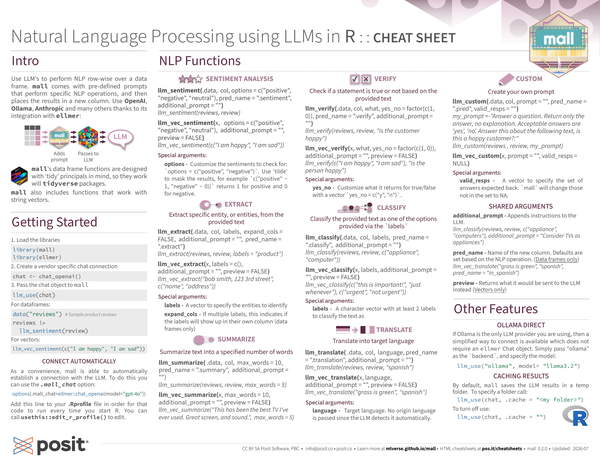
Use LLMs to perform NLP row-wise over a data frame. mall comes with pre-defined prompts that perform specific NLP operations, and then places the results in a new column.
Use OpenAI, Ollama, Anthropic and many others thanks to its integration with ellmer:

mall’s data frame functions are designed with ‘tidy’ principles in mind, so they work with the Tidyverse packages.
mall also includes functions that work with string vectors.
Python#
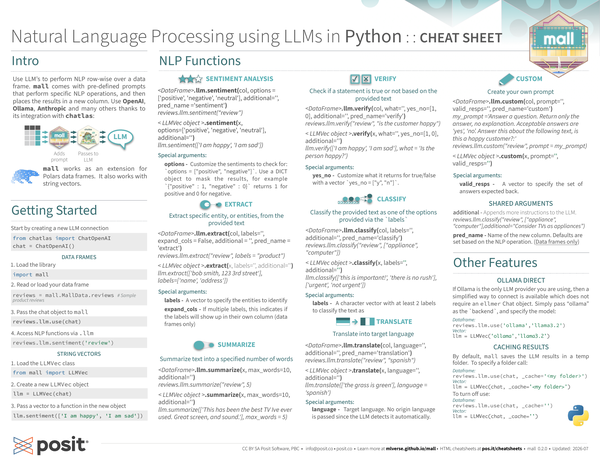
Use LLM’s to perform NLP row-wise over a data frame. mall comes with pre-defined prompts that perform specific NLP operations, and then places the results in a new column.
Use OpenAI, Ollama, Anthropic and many others thanks to its integration with chatlas:

mall works as an extension for Polars data frames. It also works with
string vectors.
Getting started#
R#
-
Load the libraries
library(mall) library(ellmer) -
Create a vendor specific chat connection
chat <- chat_openai() -
Pass the chat object to mall
llm_use(chat)
-
For dataframes:
data("reviews") # Sample product reviews reviews |> llm_sentiment(review) -
For vectors:
llm_vec_sentiment(c("I am happy", "I am sad"))
Connect automatically
As a convenience, mall is able to automatically establish a connection with the LLM.
To do this, you can use the .mall_chat option:
options(.mall_chat=ellmer::chat_openai(model="gpt-4o"))
Add this line to your .Rprofile file in order for that code to run every
time you start R. You can call usethis::edit_r_profile() to edit.
Python#
Start by creating a new LLM connection
from chatlas import ChatOpenAI
chat = ChatOpenAI()
Data frames
-
Load the library
import mall -
Read or load your data frame
reviews = mall.MallData.reviews # Sample product reviews -
Pass the chat object to mall
reviews.llm.use(chat) -
Access NLP functions via
.llmreviews.llm.sentiment('review')
String vectors
-
Load the LLMVec class
from mall import LLMVec -
Create a new LLMVec object
llm = LLMVec(chat) -
Pass a vector to a function in the new object
llm.sentiment(['I am happy', 'I am sad'])
NLP functions#
Sentiment analysis#
R#
-
llm_sentiment(.data, col, options = c("positive", "negative", "neutral"), pred_name = ".sentiment", additional_prompt = "")llm_sentiment(reviews, review) -
llm_vec_sentiment(x, options = c("positive", "negative", "neutral"), additional_prompt = "", preview = FALSE)llm_vec_sentiment(c("I am happy", "I am sad"))
Special arguments:
options: Customize the sentiments to check for: options = c("positive", "negative").
Use ’tilde’ to mask the results, for example c("positive" ~ 1, "negative" ~ 0)) returns 1 for positive and 0 for negative.
Python#
-
<Dataframe>
.llm.sentiment(col, options = ['positive', 'negative', 'neutral'], additional='', pred_name ='sentiment')reviews.llm.sentiment('review') -
<LLMVec object>
.sentiment(x, options=['positive', 'negative', 'neutral'], additional='')llm.sentiment(['I am happy', 'I am sad'])
Special arguments:
options: Customize the sentiments to check for: options = ["positive", "negative"].
Use a DICT object to mask the results, for example {"positive": 1, "negative" 0} returns 1 for positive and 0 for negative.
Extract#
Extract specific entity, or entities, from the provided text
R#
-
llm_extract(.data, col, labels, expand_cols = FALSE, additional_prompt = "", pred_name = ".extract")llm_extract(reviews, review, labels = "product") -
llm_vec_extract(x, labels = c(), additional_prompt = "", preview = FALSE)llm_vec_extract("bob smith, 123 3rd street", c("name", "address"))
Special arguments
labels: A vector to specify the entities to identify
expand_cols - If multiple labels, this indicates if the labels will show up in their own column (data frames only)
Python#
-
<DataFrame>
.llm.extract(col, labels='', expand_cols = False, additional = '', pred_name = 'extract')reviews.llm.extract("review", labels = "product") -
<LLMVec object>
.extract(x, labels='', additional='')llm.extract(['bob smith, 123 3rd street'], labels=['name', 'address'])
Special arguments
labels: A vector to specify the entities to identify
expand_cols - If multiple labels, this indicates if the labels will show up in their own column (data frames only)
Summarize#
Summarize text into a specified number of words
R#
-
llm_summarize( .data, col, max_words = 10, pred_name = ".summary", additional_prompt = "")llm_summarize(reviews, review, max_words = 5) -
llm_vec_summarize(x, max_words = 10, additional_prompt = "", preview = FALSE)llm_vec_summarize("This has been the best TV I've ever used. Great screen, and sound.", max_words = 5)
Python#
-
<DataFrame>
.llm.summarize(x, max_words=10, additional='')reviews.llm.summarize("review", 5) -
<LLMVec object>
.summarize(x, max_words=10, additional='')llm.summarize(['This has been the best TV Ive ever used. Great screen, and sound.'], max_words = 5)
Verify#
Check if a statement is true or not based on the provided text
R#
-
llm_verify(.data, col, what, yes_no = factor(c(1, 0)), pred_name = ".verify", additional_prompt = "")llm_verify(reviews, review, "is the customer happy") -
llm_vec_verify(x, what, yes_no = factor(c(1, 0)), additional_prompt = "", preview = FALSE)llm_verify(c("I am happy", "I am sad"), "is the person happy")
Special arguments
yes_no: Customize what it returns for true/false with a vector
yes_no = c("y", "n").
Python#
-
<DataFrame>
.llm.verify(col, what='', yes_no=[1, 0], additional='', pred_name='verify')reviews.llm.verify("review", "is the customer happy") -
<LLMVec object>
.verify(x, what='', yes_no=[1, 0], additional='')llm.verify(['I am happy', 'I am sad'], what = 'Is the person happy?')
Special arguments
yes_no: Customize what it returns for true/false with a vector
yes_no = ["y", "n"].
Classify#
Classify the provided text as one of the options provided via the labels
R#
-
llm_classify(.data, col, labels, pred_name = ".classify", additional_prompt = "")llm_classify(reviews, review, c("appliance", "computer")) -
llm_vec_classify(x, labels, additional_prompt = "", preview = FALSE)llm_vec_classify(c("this is important!", "just whenever"), c("urgent", "not urgent"))
Special arguments
labels: A character vector with at least 2 labels to classify the text as
Python#
-
<DataFrame>
.llm.classify(col, labels='', additional='', pred_name='classify')reviews.llm.classify("review", ["appliance", "computer"]) -
<LLMVec object>
.classify(x, labels='', additional='')llm.classify(['this is important!', 'there is no rush'], ['urgent', 'not urgent'])
Special arguments
labels: A character vector with at least 2 labels to classify the text as
Translate#
Translate into target language
R#
-
llm_translate( .data, col, language, pred_name = ".translation", additional_prompt = "")llm_translate(reviews, review, "spanish") -
llm_vec_translate(x, language, additional_prompt = "", preview = FALSE)llm_vec_translate("grass is green", "spanish")
Special arguments
language: Target language. No origin language is passed since the LLM
detects it automatically.
Python#
-
<DataFrame>
.llm.translate(col, language='', additional='', pred_name='translation')reviews.llm.translate("review", "spanish") -
<LLMVec object>
.translate(x, language='', additional='')llm.translate(['the grass is green'], language = 'spanish')
Special arguments
language: Target language. No origin language is passed since the LLM detects it automatically.
Custom#
Create your own prompt
R#
-
llm_custom(.data, col, prompt = "", pred_name = ".pred", valid_resps = "")my_prompt <- "Answer a question. Return only the answer, no explanation. Acceptable answers are 'yes', 'no'. Answer this about the following text, is this a happy customer?:" llm_custom(reviews , review, my_prompt) -
llm_vec_custom(x, prompt = "", valid_resps = NULL)
Special arguments
valid_resps: A vector to specify the set of answers expected back.
mall will change those not in the set to NA.
Python#
-
<DataFrame>
.llm.custom(col, prompt='', valid_resps='', pred_name='custom')my_prompt = "Answer a question. Return only the answer," \ " no explanation. Acceptable answers are 'yes', 'no'." \ "Answer this about the following text, is this a happy customer?:" reviews.llm.custom("review", prompt = my_prompt) -
<LLMVec object>
.custom(x, prompt='', valid_resps='')
Special arguments
valid_resps: A vector to specify the set of answers expected back.
Shared arguments#
R#
additional_prompt: Appends instructions to the LLM.
llm_classify(reviews, review, c("appliance", "computers"), additional_prompt = "Consider TVs as appliances")pred_name: Name of the new column.
Defaults are set based on the NLP operation. (Data frames only).
llm_vec_translate("grass is green", "spanish", pred_name = "in_spanish")preview: Returns what it would be sent to the LLM instead (Vectors only)
Python#
additional: Appends more instructions to the LLM.
reviews.llm.classify("review", ["appliance", "computer"], additional="Consider TVs as appliances")pred_name: Name of the new column.
Defaults are set based on the NLP operation. (Data frames only)
Other features#
Ollama direct#
R#
If Ollama is the only LLM provider you are using, then a simplified way to connect is available which does not require an ellmer Chat object.
Simply pass “ollama” as the backend, and specify the model:
llm_use("ollama", model= "llama3.2")Python#
If Ollama is the only LLM provider you are using, then a simplified way to
connect is available which does not require an ellmer Chat object.
Simply pass “ollama” as the backend, and specify the model:
-
Data frame:
reviews.llm.use('ollama','llama3.2') -
Vector:
llm = LLMVec('ollama','llama3.2')
Caching results#
R#
By default, mall saves the LLM results in a temp folder. To specify a folder call:
llm_use(chat, .cache = "<my folder>")To turn off use:
llm_use(chat, .cache = "")Python#
By default, mall saves the LLM results in a folder. To specify a folder call:
-
Data frame:
reviews.llm.use(chat, _cache='<my folder>') -
Vector:
llm = LLMVec(chat, _cache='<my folder>')
To turn off use:
-
Data frame:
reviews.llm.use(chat, _cache='') -
Vector:
llm = LLMVec(chat, _cache='')
CC BY SA Posit Software, PBC • info@posit.co • posit.co
Learn more at mlverse.github.io/mall.
Updated: 2026-08.


