

Visit r-pkgs.org to learn more about writing and publishing packages for R.
library(devtools)
library(testthat)
library(roxygen2)
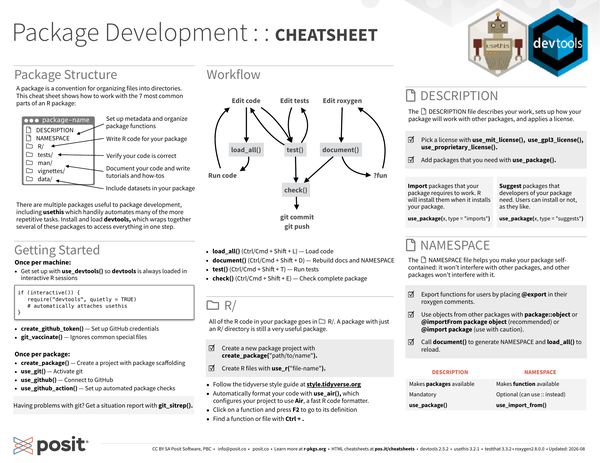
Package Structure#
A package is a convention for organizing files into directories, and creates a shareable, installable collection of functions, sample data, and documentation. This cheatsheet shows you how to work with the 7 most common parts of an R package:
- R/: Write R code for your package
- DESCRIPTION: Set up metadata and organize package functions
- NAMESPACE
- tests/: Verify your code is correct
- man/
- vignettes/: Document your code and write tutorials and how-tos
- data/: Include data sets in your package
There are multiple packages useful to package development, including usethis which handily automates many of the more repetitive tasks.
Load and install devtools which wraps together several of these packages to access everything in one step.
Getting Started#
Once per machine:
-
Get set up with
use_devtools()so devtools is always loaded in interactive R sessions.if (interactive()) { require("devtools", quietly = TRUE) # automatically attaches usethis } -
create_github_token(): Set up GitHub credentials. -
git_vaccinate(): Ignores common special files.
Once per package:
-
create_package(): Create a project with package scaffolding. -
use_git(): Activate git. -
use_github(): Connect to GitHub. -
use_github_action(): Set up automated package checks.
Having problems with git?
Get a situation report with git_sitrep().
Workflow#
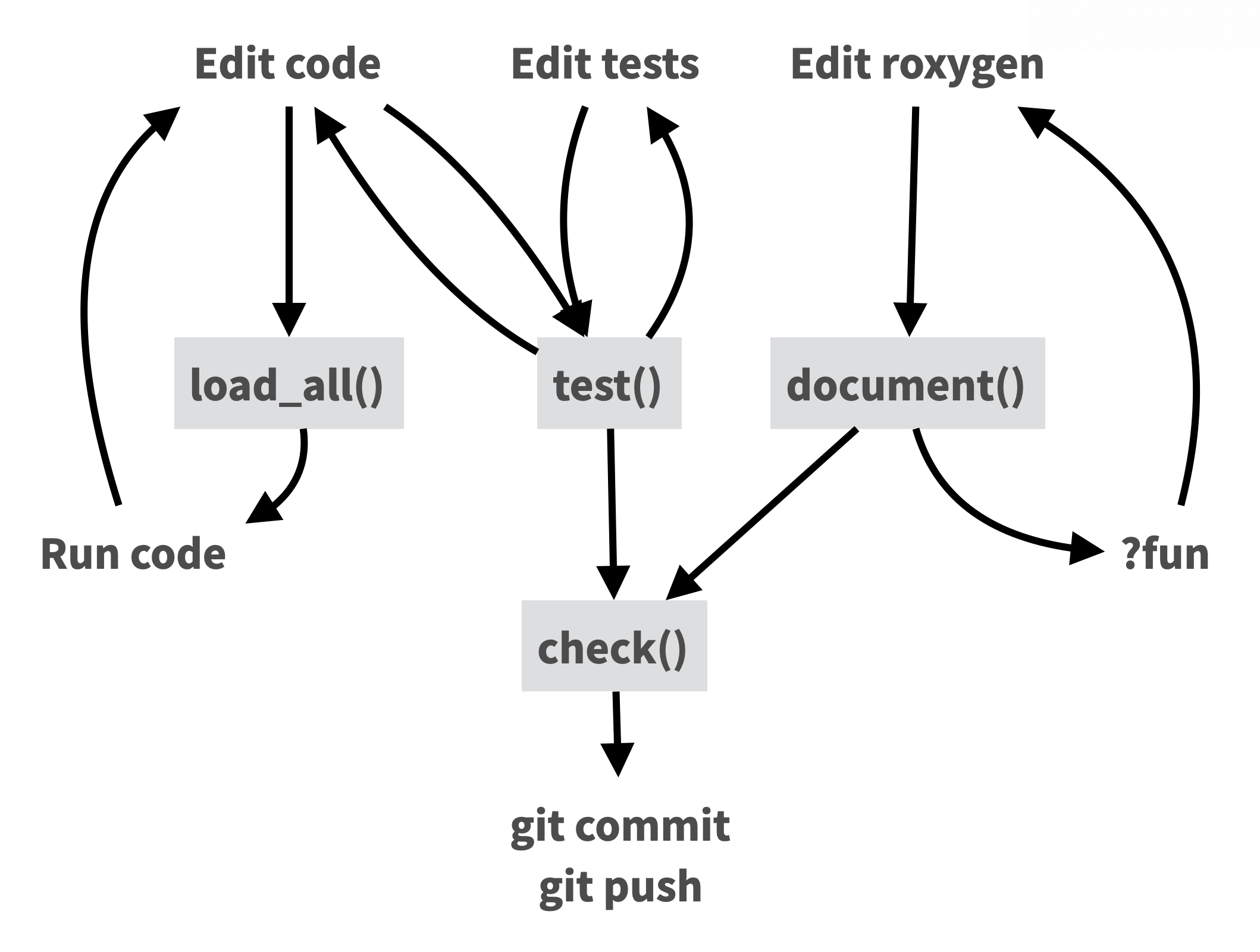
Long description of flowchart
- Edit code
- forward to load_all()
- forward to test()
- load_all()
- forward to Run code
- Run code
- back to Edit code
- Edit tests
- forward to test()
- test()
- forward to check()
- back to Edit tests
- back to Edit code
- Edit roxygen
- forward to document()
- document()
- forward to check()
- forward to "?fun"
- ?fun
- back to Edit roxygen
- check()
- forward to git commit & git push
- git commit
- git push
Key steps in the workflow (with keyboard shortcuts)#
load_all()(Ctrl/Cmd + Shift + L): Load codetest()(Ctrl/Cmd + Shift + T): Run testsdocument()(Ctrl/Cmd + Shift + D): Rebuild docs and NAMESPACEcheck()(Ctrl/Cmd + Shift + E): Check complete package
R/#
All of the R code in your package goes in R/.
A package with just an R/ directory is still a very useful package.
-
Create a new package project with
create_package("path/to/name"). -
Create R files with
use_r("file-name"). -
Follow the tidyverse style guide at style.tidyverse.org
-
Automatically format your code with
use_air(), which configures your project to use Air, a fast R code formatter. -
Put your cursor on a function and press
F2to go to its definition -
Find a function or file with the keyboard shortcut
Ctrl+.
DESCRIPTION#
The DESCRIPTION file describes your package, sets up how your package will work with other packages, and applies a license.
-
Pick a license with
use_mit_license(),use_gpl3_license(),use_proprietary_license(). -
Add packages that you need with
use_package().
Import packages that your package requires to work.
R will install them when it installs your package.
Add with use_package(pkgname, type = "imports")
Suggest packages that developers of your package need.
Users can install or not, as they like.
Add with use_package(pkgname, type = "suggests")
NAMESPACE#
The NAMESPACE file helps you make your packages self-contained: it won’t interfere with other packages, and other packages won’t interfere with it.
-
Export functions for users by placing
@exportin their roxygen comments. -
Use objects from other packages with
package::objector@importFrom package object(recommended) or@import package(use with caution). -
Call
document()to generateNAMESPACEandload_all()to reload.
| DESCRIPTION | NAMESPACE |
|---|---|
| Makes packages available | Makes functions available |
| Mandatory | Optional (can use :: instead) |
use_package() |
use_import_from() |
: Table comparing features/purpose of DESCRIPTION (left column) vs NAMESPACE (right column)
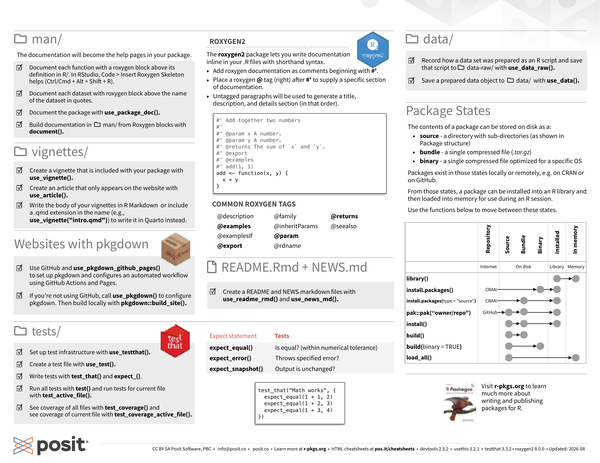
man/#
The documentation will become the help pages in your package.
-
Document each function with a roxygen block above its definition in R/. In RStudio, Code > Insert Roxygen Skeleton (Keyboard shortcut: Mac
Shift+Option+Cmd+R, Windows/LinuxShift+Alt+Ctrl+R) helps. -
Document each data set with an roxygen block above the name of the data set in quotes.
-
Document the package with
use_package_doc(). -
Build documentation in man/ from Roxygen blocks with
document().
roxygen2#
The roxygen2 package lets you write documentation inline in your .R files with shorthand syntax.
-
Add roxygen documentation as comments beginning with
#'. -
Place an roxygen
@tag (right) after#'to supply a specific section of documentation. -
Untagged paragraphs will be used to generate a title, description, and details section (in that order).
#' Add together two numbers
#'
#' @param x A number.
#' @param y A number.
#' @returns The sum of `x` and `y`
#' @export
#' @examples
#' add(1, 1)
add <- function(x, y) {
  x + y
}
Common roxygen Tags:#
@examples@export@param@returns
Also:
@description@examplesif@family@inheritParams@rdname@seealso
vignettes/#
- Create a vignette that is included with your package with
use_vignette(). - Create an article that only appears on the website with
use_article(). - Write the body of your vignettes in R Markdown or include a
.qmdextension in the name (e.g.use_vignette("intro.qmd")) to write it in Quarto instead.
Websites with pkgdown#
- Use GitHub and
use_pkgdown_github_pages()to set up pkgdown and configure an automated workflow using GitHub Actions and Pages. - If you’re not using GitHub, call
use_pkgdown()to configure pkgdown. Then build locally withpkgdown::build_site().
README.Rmd + NEWS.md#
- Create a README and NEWS markdown files with
use_readme_rmd()anduse_news_md().
tests/#
- Create a test file with
use_test(). - Write tests with
test_that()andexpect_(). - Run all tests with
test()and run tests for current file withtest_active_file(). - See coverage of all files with
test_coverage()and see coverage of current file withtest_coverage_active_file().
| Expect statement | Tests |
|---|---|
expect_equal() |
Is equal? (within numerical tolerance) |
expect_error() |
Throws specified error? |
expect_snapshot() |
Output is unchanged? |
: Table of expect functions and what each one tests
test_that("Math works", {
  expect_equal(1 + 1, 2)
  expect_equal(1 + 2, 3)
  expect_equal(1 + 3, 4)
})data/#
- Record how a data set was prepared as an R script and save that script to
data-raw/withuse_data_raw(). - Save a prepared data object to
data/withuse_data().
Package States#
The contents of a package can be stored on disk as a:
- source - a directory with sub-directories (as shown in Package Structure)
- bundle - a single compressed file (.tar.gz)
- binary - a single compressed file optimized for a specific OS
Packages exist in those states locally or remotely, e.g. on CRAN or on GitHub.
From those states, a package can be installed into an R library and then loaded into memory for use during an R session.

Use the functions below to move between these states:
library(): Installed in Library to loaded in Memory.install.packages(): Binary from CRAN repository to installed in Library.install.packages(type = "source"): Source code from CRAN repository to Bundle, to installed in Library.pak::pak("owner/repo"): Source code from GitHub (or other remotes) repository to bundle to installed in Library.install(): Local source code to bundle to installed in Library.build(): Local source to Bundle.build(binary = TRUE): Local source to Binary.load_all(): Local source to loaded in Memory.
CC BY SA Posit Software, PBC • info@posit.co • posit.co
Learn more at r-pkgs.org.
Updated: 2026-08.
packageVersion("devtools")[1] '2.5.2'packageVersion("usethis")[1] '3.2.1'packageVersion("testthat")[1] '3.3.2'packageVersion("roxygen2")[1] '8.0.0'
