

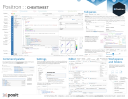

Positron is a data science IDE from Posit that supports Python and R side by side. This cheat sheet maps the IDE’s layout and most-used features for analysts and developers moving to Positron from RStudio or VS Code.
What’s covered#
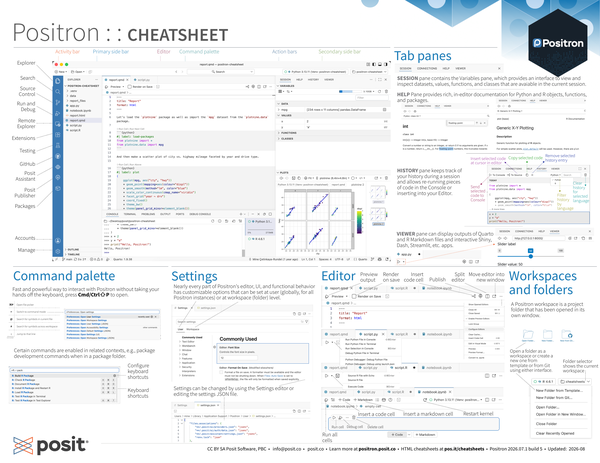
- Explorer layout – activity bar, primary and secondary side bars, editor, action bars
- Tab panes – SESSION/Variables, HELP, HISTORY, and VIEWER panes
- Command palette –
Cmd/Ctrl⇧P, file picker, symbol search, and line jump shortcuts - Settings – user-level and workspace-level configuration, Settings editor, JSON file
- Editor and notebooks – code cells, markdown cells, render on save, publishing
- Workspaces – opening folders as workspaces, creating from templates or Git
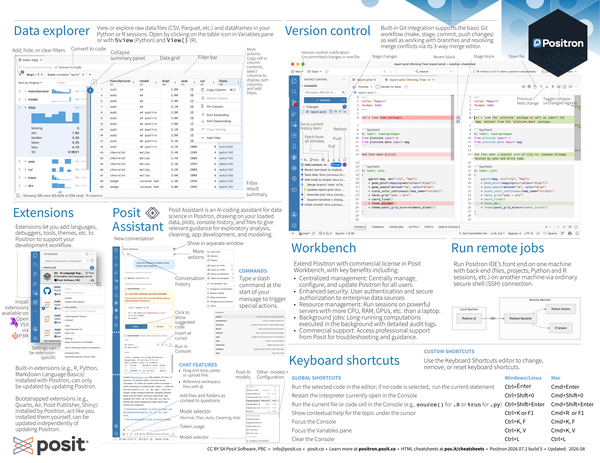
- Data explorer – view and filter raw data files and in-memory data frames
- Version control – built-in Git workflow, staging, committing, and merge editor
- Extensions and Posit Assistant – add-on languages/tools and AI coding assistant
- Console and keyboard shortcuts – interpreter restart, run shortcuts, customization


