

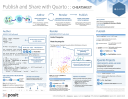

Overview#

-
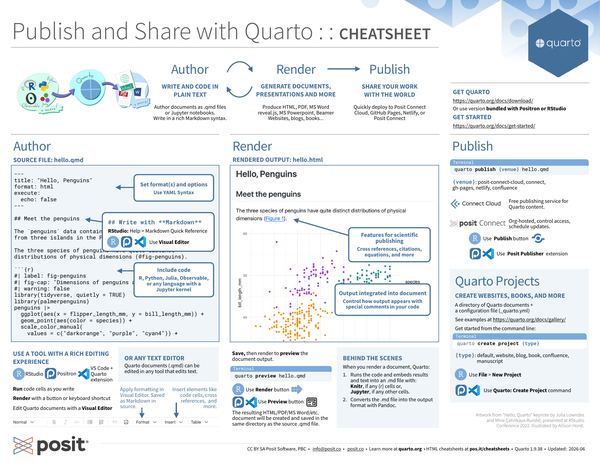
Author: Write and code in plain text. Author documents as .qmd files, or Jupyter notebooks. Write in a rich Markdown syntax.
-
Render: Generate documents, presentations and more. Produce HTML, PDF, MS Word, reveal.js, MS Powerpoint, Beamer, websites, blogs, books…
-
Share: Share your work with the world. Quickly deploy to Posit Connect Cloud, GitHub Pages, Netlify, or Posit Connect.
Get Quarto#
Get Quarto from: https://quarto.org/docs/download/
Or, use version bundled with RStudio or Positron.
Get Started#
https://quarto.org/docs/get-started
Author#
Source File: hello.qmd#
---
title: "Hello, Penguins"
format: html
execute:
  echo: false
---

## Meet the penguins

The `penguins` data contains size measurements for
penguins from three islands in the Palmer Archipelago,
Antarctica.

The three species of penguins have quite distinct
distributions of physical dimensions (@fig-penguins).

```{{r}}
#| label: fig-penguins
#| fig-cap: "Dimensions of penguins across three species."
#| warning: false
library(tidyverse, quietly = TRUE)
library(palmerpenguins)
penguins |>
  ggplot(aes(x = flipper_length_mm, y = bill_length_mm)) +
  geom_point(aes(color = species)) +
  scale_color_manual(
    values = c("darkorange", "purple", "cyan4")) +
  theme_minimal()
```
Highlights in the source file#
-
Set format(s) and options. Use YAML Syntax.
--- title: "Hello, Penguins" format: html execute: echo: false --- -
## Write with **Markdown**RStudio: Help > Markdown Quick Reference
RStudio, Positron and VS Code: Use the Visual Editor
## Meet the penguins The `penguins` data contains size measurements for penguins from three islands in the Palmer Archipelago, Antarctica. The three species of penguins have quite distinct distributions of physical dimensions (@fig-penguins). -
Include code. R, Python, Julia, Observable, or any language with a Jupyter kernel.
```{{r}}
#| label: fig-penguins
#| fig-cap: "Dimensions of penguins across three species."
#| warning: false
library(tidyverse, quietly = TRUE)
library(palmerpenguins)
penguins |>
  ggplot(aes(x = flipper_length_mm, y = bill_length_mm)) +
  geom_point(aes(color = species)) +
  scale_color_manual(
    values = c("darkorange", "purple", "cyan4")) +
  theme_minimal()
```
Use a tool with a rich authoring experience#
RStudio,
Positron with bundled Quarto extension, or
Visual Studio Code + Quarto extension
-
Run code cells as you write
-
Render with a button or keyboard shortcut
-
Edit Quarto documents with a Visual Editor

-
Apply formatting in Visual Editor. Saved as Markdown in source.
-
Insert elements like code cells, cross references, and more.
-

Or any text editor#
Quarto documents (.qmd) can be edited in any tool that edits text.
Render#
Save, then render to preview the document output.
quarto preview hello.qmdRStudio: Use Render button

Positron and VS Code: Use Preview button

The resulting HTML/PDF/MS Word/etc. document will be created and saved in the same directory as the source .qmd file.
Rendered output: hello.html#

Highlights in the rendered output#
-
Features for scientific publishing. Cross references, citations, equations, and more.
-
Output integrated into document. Control how output appears with special comments in your code.
Behind the Scenes#
When you render a document, Quarto:
- Runs the code and embeds results and text into an .md file with:
- Knitr, if any
{r}cells, or - Jupyter, if any other cells.
- Knitr, if any
- Converts the .md file into the output format with Pandoc.
Publish#
quarto publish {venue} hello.qmd{venue}: posit-connect-cloud, connect,
gh-pages, netlify, confluence
-
Posit Connect Cloud Free publishing service for Quarto content.
-
Posit Connect Org-hosted, control access, schedule updates.\
RStudio: Use Publish button

Positron and VS Code: Use Posit Publisher extension.
Quarto Projects#
Create websites, books and more#
A directory of Quarto documents + a configuration file (_quarto.yml)
See examples at: https://quarto.org/docs/gallery/
Get started from the command line:
quarto create project {type}{type}: default, website, blog, book, confluence, manuscript
RStudio: Use File > New Project
Positron and VS Code: Use Quarto: Create Project command
Include Code#
Code Cells#
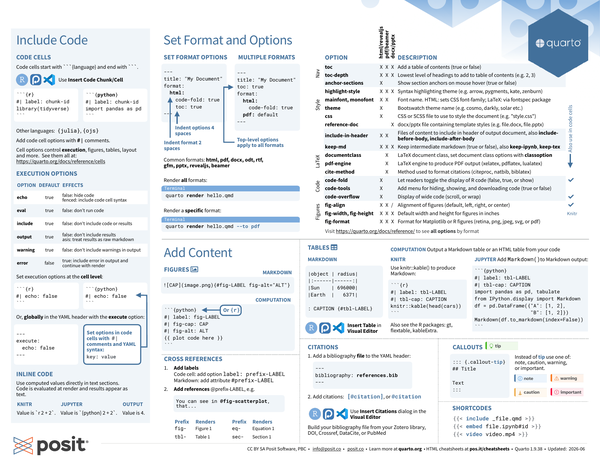
Code cells start with ```{language}, and end with ```.
RStudio, Positron & VS Code: Use Insert Code Chunk/Cell.
#| label: chunk-id#| label: chunk-idOther languages: {julia}, {ojs}
Add code cell options with #| comments.
Cell options control execution, figures, tables, layout and more. See them all at: https://quarto.org/docs/reference/cells/
Execution Options#
|
Option |
Default |
Effects |
|---|---|---|
|
|
|
|
|
|
|
|
|
|
|
|
|
|
|
|
|
|
|
|
|
|
|
|
Set execution options at the cell level:
#| echo: false#| echo: falseSet options in code cells with #| comments and YAML syntax: key: value.
Or globally in the YAML header with the execute option:
---
execute:
  echo: false
---
Inline Code#
Use computed values directly in text sections. Code is evaluated at render and results appear as text.
Knitr#
Value is `r 2 + 2`.
Jupyter#
Value is `{python} 2 + 2`.
Output#
Value is 4.
Set Formats and Options#
Set Format Options#
---
title: "My Document"
format:
  html:
    code-fold: true
    toc: true
---- Indent format 2 spaces
- Indent options 4 spaces
Multiple Formats#
---
title: "My Document"
toc: true
format:
  html:
    code-fold: true
  pdf: default
---- Top-level options (e.g.
toc) apply to all formats
Common values for format: html, pdf2, docx, odt, rtf, gfm, pptx, revealjs, beamer 3
Render all formats:
quarto render hello.qmdRender a specific format:
quarto render hello.qmd --to pdfOutput Options Table#
| Option | html/revealjs | pdf/beamer | docx/pptx | Description | cell level? |
|---|---|---|---|---|---|
| Navigation | |||||
| toc | X | X | X | Add a table of contents (true or false) | |
| toc-depth | X | X | X | Lowest level of headings to add to table of contents (e.g. 2, 3) | |
| anchor-sections | X | Show section anchors on mouse hover (true or false) | |||
| Style | |||||
| highlight-style | X | X | X | Syntax highlighting theme (e.g. arrow, pygments, kate, zenburn) | |
| mainfont, monofont | X | X | Font name. HTML: sets CSS font-family; LaTeX: via fontspec package |
||
| theme | X | Bootswatch theme name (e.g. cosmo, darkly, solar etc.) | |||
| css | X | CSS or SCSS file to use to style the document (e.g. “style.css”) | |||
| reference-doc | X | docx/pptx file containing template styles (e.g. file.docx, file.pptx) | |||
| NA | |||||
| include-in-header | X | X | Files of content to include in header of output document, also include-before-body, include-after-body | ||
| keep-md | X | X | X | Keep intermediate files (true or false), also keep-tex, keep-ipynb | |
| LaTeX | |||||
| documentclass | X | LaTeX document class, set document options with classoption | |||
| pdf-engine | X | LaTeX engine to produce PDF output (xelatex, pdflatex, lualatex) | |||
| cite-method | X | Method used to format citations (citeproc, natbib, biblatex) | |||
| Code | |||||
| code-fold | X | Let readers toggle the display of R code (false, true, or show) | X | ||
| code-tools | X | Add menu for hiding, showing, and downloading code (true or false) | |||
| code-overflow | X | Display of wide code (scroll, or wrap) | X | ||
| Figures | |||||
| fig-align | X | X | docx only | Alignment of figures (default, left, right, center) | X |
| fig-width, fig-height | X | X | X | Default width and height for figures in inches | Knitr only |
| fig-format | X | X | X | Format for Matplotlib or R figures (retina, png, jpeg, svg, or pdf) | |
Visit https://quarto.org/docs/reference/ to see all options by format
Add Content#
Figures#
Markdown#
{#fig-LABEL fig-alt="ALT"}Computation#
#| label: fig-LABEL
#| fig-cap: CAP
#| fig-alt: ALT
{{ plot code here }}
Or {r}
Tables#
Markdown#
|object | radius|
|:------|------:|
|Sun    | 696000|
|Earth  |   6371|

: CAPTION {#tbl-LABEL}Computation#
Output a markdown table or an HTML table from your code.
Knitr#
Use knitr::kable() to produce markdown:
#| label: tbl-LABEL
#| tbl-cap: CAPTION

knitr::kable(head(cars))
Also see the R packages: gt, flextable, kableExtra.
Jupyter#
Add Markdown() to Markdown output:
#| label: tbl-LABEL
#| tbl-cap: CAPTION
import pandas as pd, tabulate
from IPython.display import Markdown
df = pd.DataFrame({"A": [1, 2],
                   "B": [1, 2]})
Markdown(df.to_markdown(index=False))
Cross References#
-
Add labels:
- Code cell: add option
label: prefix-LABEL - Markdown: add attribute
#prefix-LABEL
- Code cell: add option
-
Add references:
@prefix-LABEL, e.g.You can see in @fig-scatterplot, that...
prefix |
Renders |
|---|---|
fig- |
Figure 1 |
tbl- |
Table 1 |
eq- |
Equation 1 |
sec- |
Section 1 |
Citations#
-
Add bibliography file to the YAML header:
--- bibliography: references.bib --- -
Add citations:
[@citation], or@citation
RStudio, Positron & VS Code: Use Insert Citations dialog in the Visual Editor. Build your bibliography file from your Zotero library, DOI, Crossref, DataCite, or PubMed.
Callouts#
::: {.callout-tip}
## Title

Text
:::
Instead of tip use one of: note, caution, warning, or important:
Shortcodes#
{{< include _file.qmd >}}{{< embed file.ipynb#id >}}{{< video video.mp4 >}}CC BY SA Posit Software, PBC • info@posit.co • posit.co
Learn more at quarto.org.
Quarto 1.7
Updated: 2026-08.
-
Artwork from “Hello, Quarto” keynote by Julia Lowndes and Mine Çetinkaya-Rundel, presented at RStudio Conference 2022. Illustrated by Allison Horst. ↩︎
-
PDFs and Beamer slides require LaTeX, use:
↩︎Terminalquarto install tinytex -
PDFs and Beamer slides require LaTeX, use:
↩︎Terminalquarto install tinytex
