

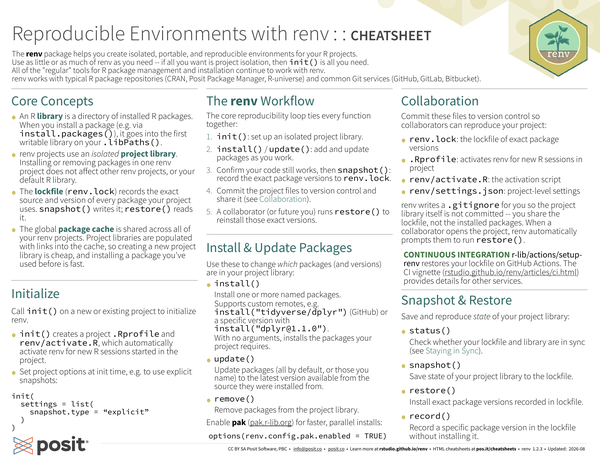
The renv package helps you create isolated, portable, and reproducible environments for your R projects.
Use as little or as much of renv as you need – if all you want is project isolation, then init() is all you need.
All of the “regular” tools for R package management and installation continue to work with renv.
renv works with typical R package repositories (CRAN, Posit Package Manager, R-universe) and common Git services (GitHub, GitLab, Bitbucket).
Core Concepts#
-
An R library is a directory of installed R packages. When you install a package (e.g. via
install.packages()), it goes into the first writable library on your.libPaths(). -
renv projects use an isolated project library. Installing or removing packages in one renv project does not affect other renv projects, or your default R library.
-
The lockfile (
renv.lock) records the exact source and version of every package your project uses.snapshot()writes it;restore()reads it. -
The global package cache is shared across all of your renv projects. Project libraries are populated with links into the cache, so creating a new project library is cheap, and installing a package you’ve used before is fast.
The renv Workflow#
The core reproducibility loop ties every function together:
init()– set up an isolated project library.install()/update()– add and update packages as you work.- Confirm your code still works, then
snapshot()– record the exact package versions to the lockfile (renv.lock). - Commit the project files to version control and share it (see Collaboration below).
- A collaborator (or future you) runs
restore()to reinstall those exact versions.
Collaboration#
Commit these files to version control so collaborators can reproduce your project:
renv.lock– the lockfile of exact package versions..Rprofile– activates renv for new R sessions in the project.renv/activate.R– the activation script.renv/settings.json– project-level settings.
renv writes a .gitignore for you so the project library itself is not committed – you share the lockfile, not the installed packages. When a collaborator opens the project, renv automatically prompts them to run restore().
The same workflow powers CI: r-lib/actions/setup-renv restores your lockfile on GitHub Actions; see the CI vignette for other services.
Initialize#
Call init() on a new or existing project to initialize renv.
-
init()creates a project.Rprofileandrenv/activate.R, which automatically activate renv for new R sessions started in the project. -
Set project options at init time, e.g. to use explicit snapshots:
init(settings = list(snapshot.type = "explicit"))Install & Update Packages#
Use these to change which packages (and versions) are in your project library:
install(): Install one or more named packages. Supports custom remotes, e.g.install("tidyverse/dplyr")(GitHub) or a specific version withinstall("dplyr@1.1.0"). With no arguments, installs the packages your project requires.update(): Update packages (all by default, or those you name) to the latest version available from the source they were installed from.remove(): Remove packages from the project library.
Enable pak for faster, parallel installs with options(renv.config.pak.enabled = TRUE).
Snapshot & Restore#
Use these to save and reproduce the state of your project library:
status(): Check whether your lockfile and library are in sync (see Staying in Sync).snapshot(): Save the state of your project library to the lockfile.restore(): Install the exact package versions recorded in the lockfile.record(): Record a specific package version in the lockfile without installing it.
Staying in Sync#
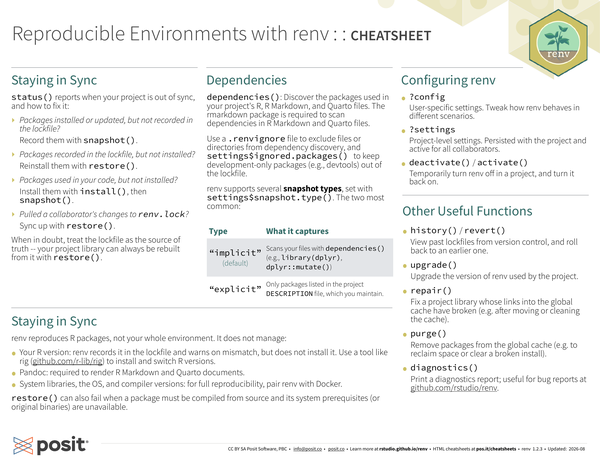
status() reports when your project is out of sync, and how to fix it:
- Packages installed or updated, but not recorded in the lockfile? Record them with
snapshot(). - Packages recorded in the lockfile, but not installed? Reinstall them with
restore(). - Packages used in your code, but not installed? Install them with
install(), thensnapshot(). - Pulled a collaborator’s changes to
renv.lock? Sync up withrestore().
When in doubt, treat the lockfile as the source of truth – your project library can always be rebuilt from it with restore().
Dependencies#
dependencies(): Discover the packages used in your project’s R, R Markdown, and Quarto files.
The rmarkdown package is required to scan dependencies in R Markdown and Quarto files.
Use a .renvignore file to exclude files or directories from dependency discovery, and settings$ignored.packages() to keep development-only packages (e.g. devtools) out of the lockfile.
renv supports several snapshot types, set with settings$snapshot.type(). The two most common:
| Type | What it captures |
|---|---|
"implicit" (default) |
Scans your files with dependencies() (e.g. library(dplyr), dplyr::mutate()). |
"explicit" |
Only packages listed in the project DESCRIPTION file, which you maintain. |
Configuring renv#
?config: User-specific settings. Tweak how renv behaves in different scenarios.?settings: Project-level settings. Persisted with the project and active for all collaborators.deactivate()/activate(): Temporarily turn renv off in a project, and turn it back on.
Other Useful Functions#
history()/revert(): View past lockfiles from version control, and roll back to an earlier one.upgrade(): Upgrade the version of renv used by the project.repair(): Fix a project library whose links into the global cache have broken (e.g. after moving or cleaning the cache).purge(): Remove packages from the global cache (e.g. to reclaim space or clear a broken install).diagnostics(): Print a diagnostics report; useful for bug reports at github.com/rstudio/renv.
What renv Does Not Do#
renv reproduces R packages, not your whole environment. It does not manage:
- Your R version – renv records it in the lockfile and warns on mismatch, but does not install it. Use a tool like rig to install and switch R versions.
- Pandoc – required to render R Markdown and Quarto documents.
- System libraries, the OS, and compiler versions – for full reproducibility, pair renv with Docker.
restore() can also fail when a package must be compiled from source and its system prerequisites (or original binaries) are unavailable.
CC BY SA Posit Software, PBC • info@posit.co • posit.co
Learn more at rstudio.github.io/renv
Updated: 2026-08.
packageVersion("renv")[1] '1.2.3'