





Build an App#
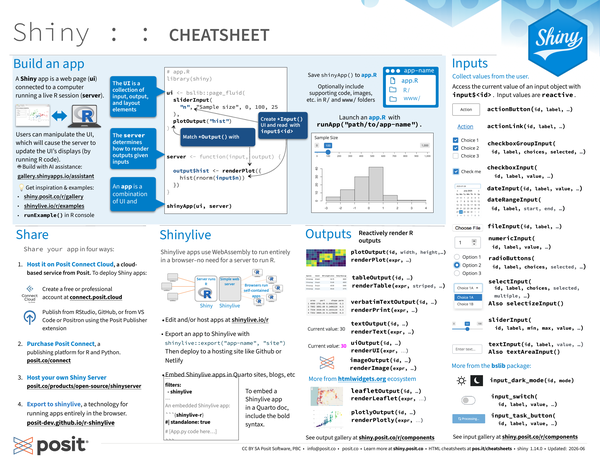
A Shiny app is a web page (ui) connected to a computer running a live R session (server).
library(shiny)Users can manipulate the UI, which will cause the server to update the UI’s displays (by running R code).
- The UI is a collection of input, output, and layout elements.
- The server determines how to render outputs given inputs.
- An app is a combination of UI and server.
Create *Input() UI elements and read them with input$<id>. Match *Output() elements with render*() functions.
# app.R
library(shiny)

ui <- bslib::page_fluid(
  sliderInput("n", "Sample size", 0, 100, 25),
  plotOutput("hist")
)

server <- function(input, output) {
  output$hist <- renderPlot({
    hist(rnorm(input$n))
  })
}

shinyApp(ui, server)
Save shinyApp() to app.R. Keep your app in a directory along with optional supporting code, images, etc.
- app-name: The directory name is the app name
- app.R
- R/: (optional) directory of supplemental .R files that are sourced automatically
- www/: (optional) directory of files to share with web browsers (images, CSS, .js, etc.)
Launch an app.R with runApp("path/to/app-name").
Get inspiration and examples from shiny.posit.co/r/gallery, shinylive.io/r/examples, or by running runExample() in the R console.
Build with AI assistance at gallery.shinyapps.io/assistant.
Share#
Share your app in four ways:
-
Host it on Posit Connect Cloud, a cloud based service from Posit. To deploy Shiny apps:
- Create a free or professional account at connect.posit.cloud
- Publish from RStudio, GitHub, or from VS Code or Positron using the Posit Publisher extension
-
Purchase Posit Connect, a publishing platform for R and Python. posit.co/connect
-
Host your own Shiny Server. posit.co/products/open-source/shinyserver
-
Export to Shinylive, a technology for running apps entirely in the browser. posit-dev.github.io/r-shinylive
Shinylive#
Shinylive apps use WebAssembly to run entirely in a browser—no need for a server to run R.
- Edit and/or host apps at shinylive.io/r.
- Export an app to Shinylive with
shinylive::export("app-name", "site"). Then deploy to a hosting site like Github or Netlify. - Embed Shinylive apps in Quarto sites, blogs, etc.
To embed a Shinylive app in a Quarto doc, include the below syntax.
---
filters:
- shinylive
---

An embedded Shinylive app:

```{{shinylive-r}}
#| standalone: true
# [App.py code here...]
```Outputs#
Reactively render R output. Match a render*() function to its corresponding *Output() function.
|
|
|
|---|---|
|
|
|
|
|
|
|
|
|
|
|
|
|
|
|
|
|
|
See the output gallery at shiny.posit.co/r/components.
More from the htmlwidgets.org ecosystem:
renderLeaflet(expr, …)withleafletOutput(id, …)renderPlotly(expr, …)withplotlyOutput(id, …)
Inputs#
Collect values from the user.
Access the current value of an input object with input$<id>. Input values are reactive.
-
actionButton(id, label, ...) -
actionLink(id, label, ...) -
checkboxGroupInput(id, label, choices, selected, ...) -
checkboxInput(id, label, value, ...) -
dateInput(id, label, value, ...) -
dateRangeInput(id, label, start, end, ...) -
fileInput(id, label, ...) -
numericInput(id, label, value, ...) -
radioButtons(id, label, choices, selected, ...) -
selectInput(id, label, choices, selected, multiple, ...). AlsoselectizeInput() -
sliderInput(id, label, min, max, value, ...) -
textInput(id, label, value, ...). AlsotextAreaInput()
More from the bslib package:
-
input_dark_mode(id, mode) -
input_switch(id, label, value, ...) -
input_task_button(id, label, value, ...)
See the input gallery at shiny.posit.co/r/components.
Reactivity#
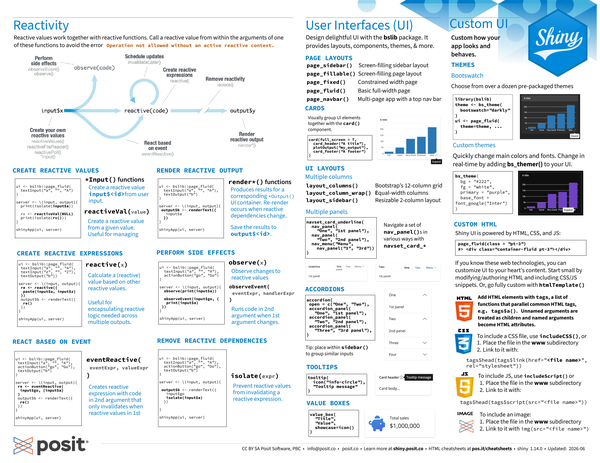
Reactive values work together with reactive functions. Call a reactive value from within the arguments of one of these functions to avoid the error Operation not allowed without an active reactive context.

Expand to read about the reactivity diagram
Phases in the reactivity diagram#
- Create your own reactive values
reactiveValues()reactiveFileReader()reactivePoll()*Input()
- Perform side effects
observeEvent()observe()
- Schedule updates
invalidateLater()
- Create reactive expressions
reactive()
- Remove reactivity
isolate()
- React based on event
eventReactive()
- Render reactive output
render*()
Create Reactive Values#
-
*Input()functions: Create a reactive valueinput$<id>from user input.ui <- bslib::page_fluid( textInput("a", "", "A") ) -
reactiveVal(value): Create a reactive value from a given value. Useful for managing state.server <- \(input, output) { print(isolate(input$a)) rv <- reactiveVal(NULL) print(isolate(rv())) }
Create Reactive Expressions#
reactive(x):
-
Calculate a (reactive) value based on other reactive values. Useful for encapsulating reactive logic needed across multiple outputs.
-
Call the expression with function syntax, e.g.
re().ui <- bslib::page_fluid( textInput("a", "", "A"), textInput("z", "", "Z"), textOutput("b") ) server <- \(input, output) { re <- reactive({ paste(input$a, input$z) }) output$b <- renderText({ re() }) } shinyApp(ui, server)
React Based on Event#
eventReactive(eventExpr, valueExpr): Creates reactive expression with code in 2nd argument that only invalidates when reactive values in 1st argument change.
ui <- bslib::page_fluid(
  textInput("a", "", "A"),
  actionButton("go", "Go"),
  textOutput("b")
)

server <- \(input, output) {
  re <- eventReactive(input$go, {
    input$a
  })
  output$b <- renderText({
    re()
  })
}

shinyApp(ui, server)
Render Reactive Output#
render*() functions:
-
Produces results for a corresponding
*Output()UI container. Re-render occurs when reactive dependencies change. -
Save the results to
output$<id>.ui <- bslib::page_fluid( textInput("a", "", "A"), textOutput("b") ) server <- \(input, output) { output$b <- renderText({ input$a }) } shinyApp(ui, server)
Perform Side Effects#
-
observe(x): Observe changes to reactive values. -
observeEvent(eventExpr, handlerExpr): Runs code in 2nd argument when 1st argument changes.ui <- bslib::page_fluid( textInput("a", "", "A"), actionButton("go", "Go") ) server <- \(input, output) { observe(print(input$a)) observeEvent(input$go, { print(input$a) }) } shinyApp(ui, server)
Remove Reactive Dependencies#
isolate(expr): Prevent reactive values from invalidating a reactive expression.
ui <- bslib::page_fluid(
  textInput("a", "", "A"),
  actionButton("go", "Go"),
  textOutput("b")
)

server <- \(input, output) {
  output$b <- renderText({
    input$go
    isolate(input$a)
  })
}

shinyApp(ui, server)
User Interfaces (UI)#
Design delightful UI with the bslib package. It provides layouts, components, themes, & more.
Page layouts#
-
page_sidebar()- Screen-filling sidebar layout -
page_fillable()- Screen-filling page layout -
page_fixed()- Constrained width page -
page_fluid()- Basic full-width page -
page_navbar()- Multi-page app with a top nav bar
UI layouts#
Multiple columns#
-
layout_columns()- Bootstrap’s 12-column grid -
layout_column_wrap()- Equal-width columns -
layout_sidebar()- Resizable 2-column layout
Multiple panels#
Navigate a set of nav_panel()s in various ways with navset_card_*.
navset_card_underline(
  nav_panel("One", "1st panel"),
  nav_panel("Two", "2nd panel"),
  nav_menu("Menu", nav_panel("3", "3rd"))
)Cards#
Visually group UI elements together with the card() component.
card(
  full_screen = T,
  card_header("A title"),
  plotOutput("my_output"),
  card_footer("A footer")
)Accordions#
accordion(
  open = c("One", "Two"),
  accordion_panel(
    "One",
    "1st panel"
  ),
  accordion_panel(
    "Two",
    "2nd panel"
  ),
  accordion_panel(
    "Three",
    "3rd panel"
  ),
)
Tip: place within sidebar() to group similar inputs.
Tooltips#
tooltip(
  icon("info-circle"),
  "Tooltip message"
)
Value boxes#
value_box(
  "Title",
  "Value",
  showcase = icon()
)Themes#
Choose from over a dozen pre-packaged themes with the bslib package to customize how your app looks and behaves.
library(bslib)
theme <- bs_theme(
  bootswatch = "darkly"
)
ui <- page_fluid(
  theme = theme,
  ...
)
Quickly change main colors and fonts by customizing individual arguments. Change in real-time by adding bs_themer() to your UI.
bs_theme(
  bg = "#222",
  fg = "white",
  primary = "purple",
  base_font = font_google("Inter")
)
Custom UI#
Shiny UI is powered by HTML, CSS, and JS. If you know these web technologies, you can customize UI to your heart’s content. Start small by modifying/authoring HTML and including CSS/JS snippets. Or, go fully custom with htmlTemplate().
Add HTML elements with tags, a list of functions that parallel common HTML tags, e.g. tags$a(). Unnamed arguments are treated as children and named arguments become HTML attributes.
page_fluid(class = "pt-3")
#> <div class="container-fluid pt-3"></div>
To include a CSS file, use includeCSS(), or
-
Place the file in the
wwwsubdirectory -
Link to it with:
tags$head(tags$link(href = "<file name>", rel = "stylesheet"))
To include JS, use includeScript(), or
-
Place the file in the
wwwsubdirectory -
Link to it with:
tags$head(tags$script(src = "<file name>"))
To include an image:
-
Place the file in the
wwwsubdirectory -
Link to it with
img(src = "<file name>").
CC BY SA Posit Software, PBC • info@posit.co • posit.co
Learn more at shiny.posit.co
Updated: 2026-08.
packageVersion("shiny")[1] '1.14.0'