


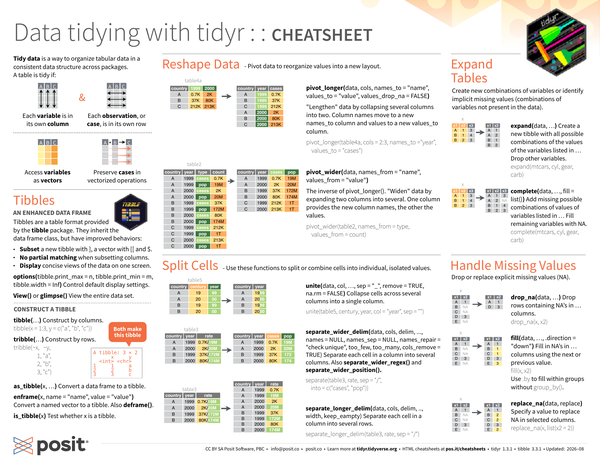
Tidy data is a way to organize tabular data in a consistent data structure across packages. A table is tidy if:
- Each variable is in its own column
- Each observation, or case, is in its own row
- Access variables as vectors
- Preserve cases in vectorized operations
library(tidyr)
library(tibble)Tibbles#
An Enhanced Data Frame#
Tibbles are a table format provided by the tibble package. They inherit the data frame class, but have improved behaviors:
-
Subset a new tibble with
], a vector with[[and$. -
No partial matching when subsetting columns.
-
Display concise views of the data on one screen.
-
options(tibble.print_max = n, tibble.print_min = m, tibble.width = Inf): Control default display settings. -
View()orglimpse(): View the entire data set.
Construct a Tibble#
tibble(...): Construct by columns.
tibble(
  x = 1:3,
  y = c("a", "b", "c")
)
# A tibble: 3 × 2
x y
<int> <chr>
1 1 a
2 2 b
3 3 c tribble(...): Construct by rows.
tribble(
  ~x , ~y  ,
   1 , "a" ,
   2 , "b" ,
   3 , "c"
)-
as_tibble(x, ...): Convert a data frame to a tibble. -
enframe(x, name = "name", value = "value"): Convert a named vector to a tibble. Alsodeframe(). -
is_tibble(x): Test whether x is a tibble.
Reshape Data#
Pivot data to reorganize values into a new layout.
-
pivot_longer(data, cols, name_to = "name", values_to = "value", values_drop_na = FALSE): “Lengthen” data by collapsing several columns into two.- The initial
table4alooks like the following:
table4a# A tibble: 3 × 3 country `1999` `2000` <chr> <dbl> <dbl> 1 Afghanistan 745 2666 2 Brazil 37737 80488 3 China 212258 213766- Column names move to a new
names_tocolumn and values to a newvalues_tocolumn. The output ofpivot_longer()will look like the following:
pivot_longer(table4a, cols = 2:3, names_to = "year", values_to = "cases")# A tibble: 6 × 3 country year cases <chr> <chr> <dbl> 1 Afghanistan 1999 745 2 Afghanistan 2000 2666 3 Brazil 1999 37737 4 Brazil 2000 80488 5 China 1999 212258 6 China 2000 213766 - The initial
-
pivot_wider(data, name_from = "name", values_from = "value"): The inverse ofpivot_longer(). “Widen” data by expanding two columns into several.- The initial
table2looks like the following:
table2# A tibble: 12 × 4 country year type count <chr> <dbl> <chr> <dbl> 1 Afghanistan 1999 cases 745 2 Afghanistan 1999 population 19987071 3 Afghanistan 2000 cases 2666 4 Afghanistan 2000 population 20595360 5 Brazil 1999 cases 37737 6 Brazil 1999 population 172006362 7 Brazil 2000 cases 80488 8 Brazil 2000 population 174504898 9 China 1999 cases 212258 10 China 1999 population 1272915272 11 China 2000 cases 213766 12 China 2000 population 1280428583- One column provides the new column names, the other the values. The output of
pivot_wider()will look like the following:
pivot_wider(table2, names_from = type, values_from = count)# A tibble: 6 × 4 country year cases population <chr> <dbl> <dbl> <dbl> 1 Afghanistan 1999 745 19987071 2 Afghanistan 2000 2666 20595360 3 Brazil 1999 37737 172006362 4 Brazil 2000 80488 174504898 5 China 1999 212258 1272915272 6 China 2000 213766 1280428583 - The initial
Split Cells#
Use these functions to split or combine cells into individual, isolated values.
-
unite(data, col, ..., sep = "_", remove = TRUE, na.rm = FALSE): Collapse cells across several columns into a single column.- The initial
table5looks like the following:
table5# A tibble: 6 × 4 country century year rate <chr> <chr> <chr> <chr> 1 Afghanistan 19 99 745/19987071 2 Afghanistan 20 00 2666/20595360 3 Brazil 19 99 37737/172006362 4 Brazil 20 00 80488/174504898 5 China 19 99 212258/1272915272 6 China 20 00 213766/1280428583- The output of
unite()will look like the following:
unite(table5, century, year, col = "year", sep = "")# A tibble: 6 × 3 country year rate <chr> <chr> <chr> 1 Afghanistan 1999 745/19987071 2 Afghanistan 2000 2666/20595360 3 Brazil 1999 37737/172006362 4 Brazil 2000 80488/174504898 5 China 1999 212258/1272915272 6 China 2000 213766/1280428583 - The initial
-
separate_wider_delim(data, cols, delim, ..., names = NULL, names_sep = NULL, names_repair = "check unique", too_few, too_many, cols_remove = TRUE): Separate each cell in a column into several columns. Alsoextract().- The initial
table3looks like the following:
table3# A tibble: 6 × 3 country year rate <chr> <dbl> <chr> 1 Afghanistan 1999 745/19987071 2 Afghanistan 2000 2666/20595360 3 Brazil 1999 37737/172006362 4 Brazil 2000 80488/174504898 5 China 1999 212258/1272915272 6 China 2000 213766/1280428583- The output of
separate_wider_delim()will look like the following:
separate_wider_delim(table3, rate, delim = "/", names = c("cases", "pop"))# A tibble: 6 × 4 country year cases pop <chr> <dbl> <chr> <chr> 1 Afghanistan 1999 745 19987071 2 Afghanistan 2000 2666 20595360 3 Brazil 1999 37737 172006362 4 Brazil 2000 80488 174504898 5 China 1999 212258 1272915272 6 China 2000 213766 1280428583 - The initial
-
separate_longer_delim(data, cols, delim, .., width, keep_empty): Separate each cell in a column into several rows.- The initial
table3looks like the following:
table3# A tibble: 6 × 3 country year rate <chr> <dbl> <chr> 1 Afghanistan 1999 745/19987071 2 Afghanistan 2000 2666/20595360 3 Brazil 1999 37737/172006362 4 Brazil 2000 80488/174504898 5 China 1999 212258/1272915272 6 China 2000 213766/1280428583- The output of
separate_longer_delim()will look like the following:
separate_longer_delim(table3, rate, delim = "/")# A tibble: 12 × 3 country year rate <chr> <dbl> <chr> 1 Afghanistan 1999 745 2 Afghanistan 1999 19987071 3 Afghanistan 2000 2666 4 Afghanistan 2000 20595360 5 Brazil 1999 37737 6 Brazil 1999 172006362 7 Brazil 2000 80488 8 Brazil 2000 174504898 9 China 1999 212258 10 China 1999 1272915272 11 China 2000 213766 12 China 2000 1280428583 - The initial
Expand Tables#
Create new combinations of variables or identify implicit missing values (combinations of variables not present in the data).
-
expand(data, ...): Create a new tibble with all possible combinations of the values of the variables listed in … Drop other variables.expand(mtcars, cyl, gear, carb) -
complete(data, ..., fill = list()): Add missing possible combinations of values of variables listed in … Fill remaining variables with NA.complete(mtcars, cyl, gear, carb)
Handle Missing Values#
Drop or replace explicit missing values (NA).
x <- tribble(
  ~x1 , ~x2 ,
  "A" ,   1 ,
  "B" , NA  ,
  "C" , NA  ,
  "D" ,   3 ,
  "E" , NA
)-
drop_na(data, ...): Drop rows containingNAs in … columns.drop_na(x, x2) -
fill(data, ..., .direction = "down"): Fill inNAs in … columns using the next or previous value. Use.byto fill within groups without a separategroup_by()call.fill(x, x2) -
replace_na(data, replace): Specify a value to replaceNAin selected columns.replace_na(x, list(x2 = 2))
Nested Data#
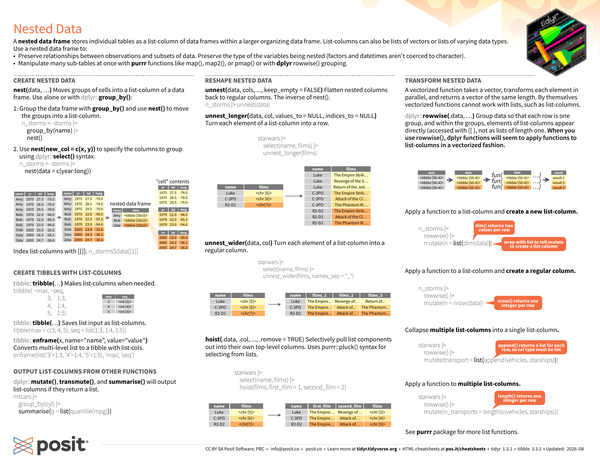
A nested data frame stores individual tables as a list-column of data frames within a larger organizing data frame. List-columns can also be lists of vectors or lists of varying data types. Use a nested data frame to:
- Preserve relationships between observations and subsets of data. Preserve the type of the variables being nested (factors and datetimes aren’t coerced to character).
- Manipulate many sub-tables are once with purrr functions like
map(),map2(), orpmap()or with dplyrrowwise()grouping.
Create Nested Data#
nest(data, ...): Moves groups of cells into a list-column of a data frame. Use alone or withdplyr::group_by().
-
Group the data frame with
group_by()and usenest()to move the groups into a list-column.n_storms <- storms |> group_by(name) |> nest() -
Use
nest(new_col = c(x,y))to specify the columns to group usingdplyr::select()syntax.n_storms <- storms |> nest(data = c(year:long))
-
Index list-columns with
[[]].n_storms$data[[1]]
Create Tibbles With List-Columns#
tibble::tribble(...): Makes list-columns when needed.
tribble(
  ~max , ~seq ,
     3 , 1:3  ,
     4 , 1:4  ,
     5 , 1:5
)tibble::tibble(...): Saves list input as list-columns.
tibble(
  max = c(3, 4, 5),
  seq = list(1:3, 1:4, 1:5)
)
tibble::enframe(x, name = "name", value = "value"): Convert multi-level list to a tibble with list-cols.
enframe(list("3" = 1:3, "4" = 1:4, "5" = 1:5), "max", "seq")Output List-Columns From Other Functions#
dplyr::mutate(),transmute(), andsummarise()will output list-columns if they return a list.
mtcars |>
  group_by(cyl) |>
  summarise(q = list(quantile(mpg)))
Reshape Nested Data#
unnest(data, cols, ..., keep_empty = FALSE): Flatten nested columns back to regular columns. The inverse ofnest().
n_storms |> unnest(data)unnest_longer(data, col, values_to = NULL, indices_to = NULL): Turn each element of a list-column into a row.
starwars |>
  select(name, films) |>
  unnest_longer(films)
unnest_wider(data, col): Turn each element of a list-column into a regular column.
starwars |>
  select(name, films) |>
  unnest_wider(films, names_sep = "_")
hoist(.data, .col, ..., remove = TRUE): Selectively pull list components out into their own top-level columns. Usespurrr::pluck()syntax for selecting from lists.
starwars |>
  select(name, films) |>
  hoist(films, first_film = 1, second_film = 2)
Transform Nested Data#
A vectorized function takes a vector, transforms each element in parallel, and returns a vector of the same length. By themselves vectorized functions cannot work with lists, such as list-columns.
-
dplyr::rowwise(.data, ...): Group data so that each row is one group, and within the groups, elements of list-columns appear directly (accessed with[[), not as lists of length one. When you use rowwise(), dplyr functions will seem to apply functions to list-columns in a vectorized fashion. -
Apply a function to a list-column and create a new list-column. In this example,
dim()returns two values per row and so is wrapped withlist()to tellmutate()to create a list-column.
n_storms |>
  rowwise() |>
mutate(n = list(dim(data))) # dim() returns two values per row, wrap with list to tell mutate to create a list-column- Apply a function to a list-column and create a regular column. In this example,
nrow()returns one integer per row.
n_storms |>
  rowwise() |>
mutate(n = nrow(data)) # nrow() returns one integer per row- Collapse multiple list-columns into a single list-column.
In this example,
append()returns a list for each row, so col type must be list.
starwars |>
  rowwise() |>
mutate(transport = list(append(vehicles, starships))) # append() returns a list for each row, so col type must be list- Apply a function to multiple list-columns. In this example,
length()returns one integer per row.
starwars |>
  rowwise() |>
mutate(n_transports = length(c(vehicles, starships))) # length() returns one integer per row- See purrr package for more list functions.
CC BY SA Posit Software, PBC • info@posit.co • posit.co
Learn more at tidyr.tidyverse.org.
Updated: 2026-08.
packageVersion("tidyr")[1] '1.3.2'packageVersion("tibble")[1] '3.3.1'